Convert Encoding (UTF-8)

I copy a string of words (Chinese characters) from a webpage into target segment of Wordbee Editor and I don't know the encoding of these words. The words appear to be correct and readable in the Editor and in the downloaded target file (MS Word 2013). But when the file is converted into PDF, the words are encoded wrongly. So I check the encoding of the original webpage and find that they are not UTF-8.
Is it possible to check for wrong encoding in the translation with QA or other tool?
-

As far as I see it is not possible to check wrong encoding in the QA.
When finalizing the document have you selected to convert the whole thing to UTF-8?
0 -
thanks Teofil.
How do I convert the whole file into UTF-8 in Wordbee? Is that an option? I normally just finalize and create translation file.
0 -
when you are in Manage window, Summary tab there you can click "Finalise" and you will get an option to choose encoding from the list. Let me know if it works.
Best
0 -
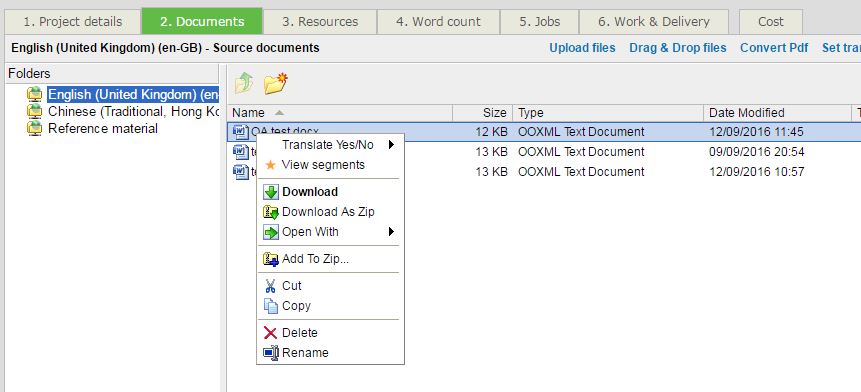
I didn't find Manage window (Project > Documents) you mentioned. In the online help (http://documents.wordbee.com/display/bb/PT+-+How+can+I+cancel+work+in+Wordbee+Translator), there should be a "manage document" option. But in my project, there isn't.
 0
0 -
is this option only available in a codyt project?
0 -
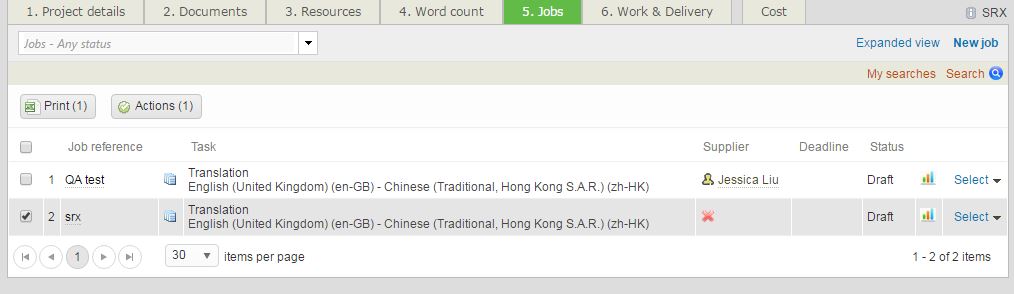
You need to access manage option from Jobs tab. Right now you are in the documents tab.
0 -
where is the "manage option" in Jobs tab?
 0
0 -
It is available in codyt jobs.
1 -

You cannot change the encoding of a Word file and your issue is not really related to encoding problems. As you describe the finalized Word file looks just fine.
In my opinion the problem is the font you are using. It may not be supported by the PDF converter you are using. You could try to open the finalized Word file and apply a different (maybe more commonly used font for Chinese). Then convert again.
Most users cope with character encoding problems in Word by activating font replacement options in the filter.
Go to "Settings" > "Microsoft Word" > your config and set these options there:

I hope this helps,
Stephan
Regards,
Stephan
Note: Indeed you can change the encoding when finalizing files but this option is only available for text based formats such as XML, HTML, etc.
1 -
Thanks Stephan!
There are a few Chinese characters wrongly encoded (not compatiable with the selected font) occasionally. I find another way to spot some of them. Save the downloaded translation (Word file) as plain text. Characters with different encoding will be highlighted in red in Preview window. But, this only works for some characters.
0 -
Hi Jessica, yes I understand this approach.
However, I guess ultimately you do not want to do such a manual check each time. Changing the font in the filter settings would make this automatic (if your client accepts such a change of course).
0
Bitte melden Sie sich an, um einen Kommentar zu hinterlassen.
Kommentare
11 Kommentare