QA check for terms

The profile of my QA check for terms looks like this:

But I find that the wrong translation of terms cannot be found. I wonder if Wordbee QA can check terms when I'm translating English to Chinese.
-

Hello,
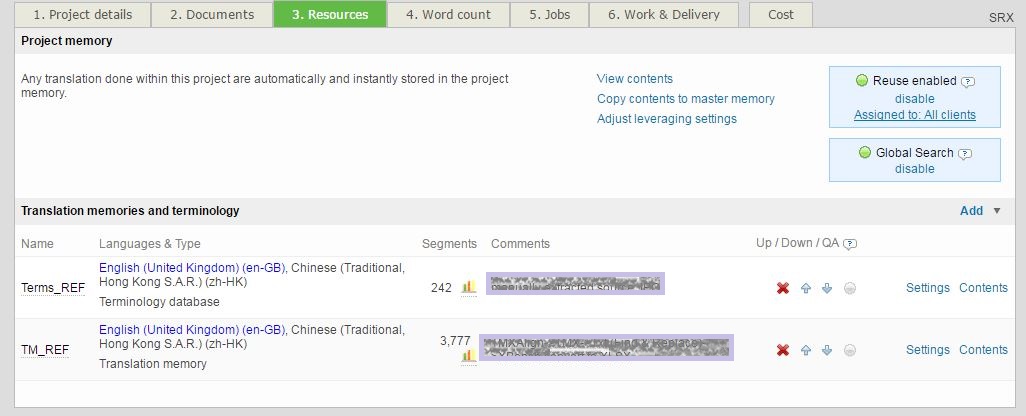
could you please send me a screenshot of Resources view of the project you are referring to?
 0
0 -
Hi Teofil,
Here is the screenshot. Thanks!
 0
0 -
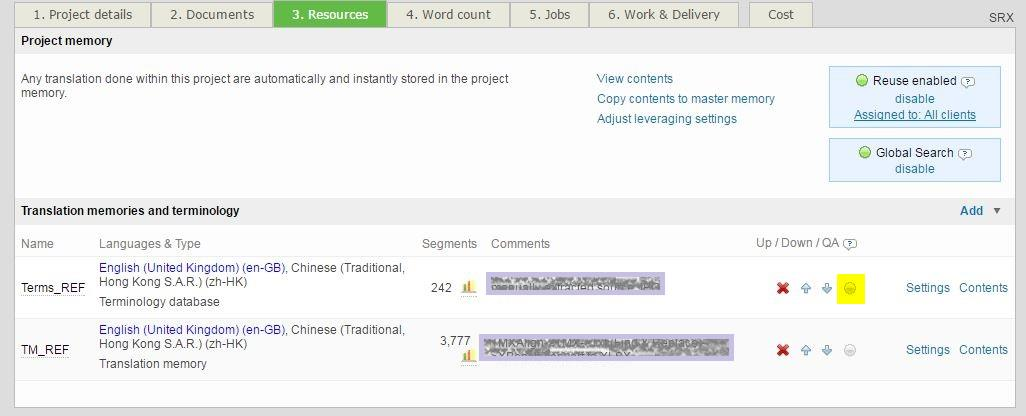
Thanks Jessica, in order to enable termbase for QA check you need to click the icon highlighted in yellow on a screenshot below.
Hope it helps
All the best
 0
0 -
Got it! Thank you for your reply.
I find something else. Similar with QA check for numbers (please refer to https://wordbee.zendesk.com/hc/en-us/community/posts/114094211534-QA-check-for-terms), QA check for terms can also find me one error in one target segment.
For exmaple, in this screenshot, I deliberately type in a wrong translation of two terms. One of them is spotted (i.e. "Latest Practicable Date"). But the other one "Track Record Period" is not.
Also, I'd like to know if the match rate of the term has to be 100% for this QA check of terms to work? I find that wrong translation of a term with a 88% match was not marked as an error.
0
Bitte melden Sie sich an, um einen Kommentar zu hinterlassen.
Kommentare
4 Kommentare