create rule to exclude non-translatable terms in xml files

Dear all,
I'm a client and we are using Wordbee in connection with AEM. I would like to find a way to exclude non-translatable terms such as brand names, labels from analysis and wordcounts. File format is xml files.
Thanks in advance for helping.
Best,
Angelique Pillal
-

Dear Angelique,
thanks for posting your query.
You can use this tab in your configuration

for this purpose.
All the best
Wojciech
0 -
Is this interface in Beebox?
0 -
No, it is in Wordbee but from there you can easily set up correct settings, export them and import into Beebox.
Let me explain step by step.
- Wordbee gives you nice interface to create your configuration like this:
-
 There you can setup correct settings to extract your XML file according to your requirements
 - Then you can download this configuration.

5. Open downloaded file in Notepad and copy the whole content of the file.In Beebox project go to Settings and click Edit

6. Scroll down a bit and click Add or replace rule
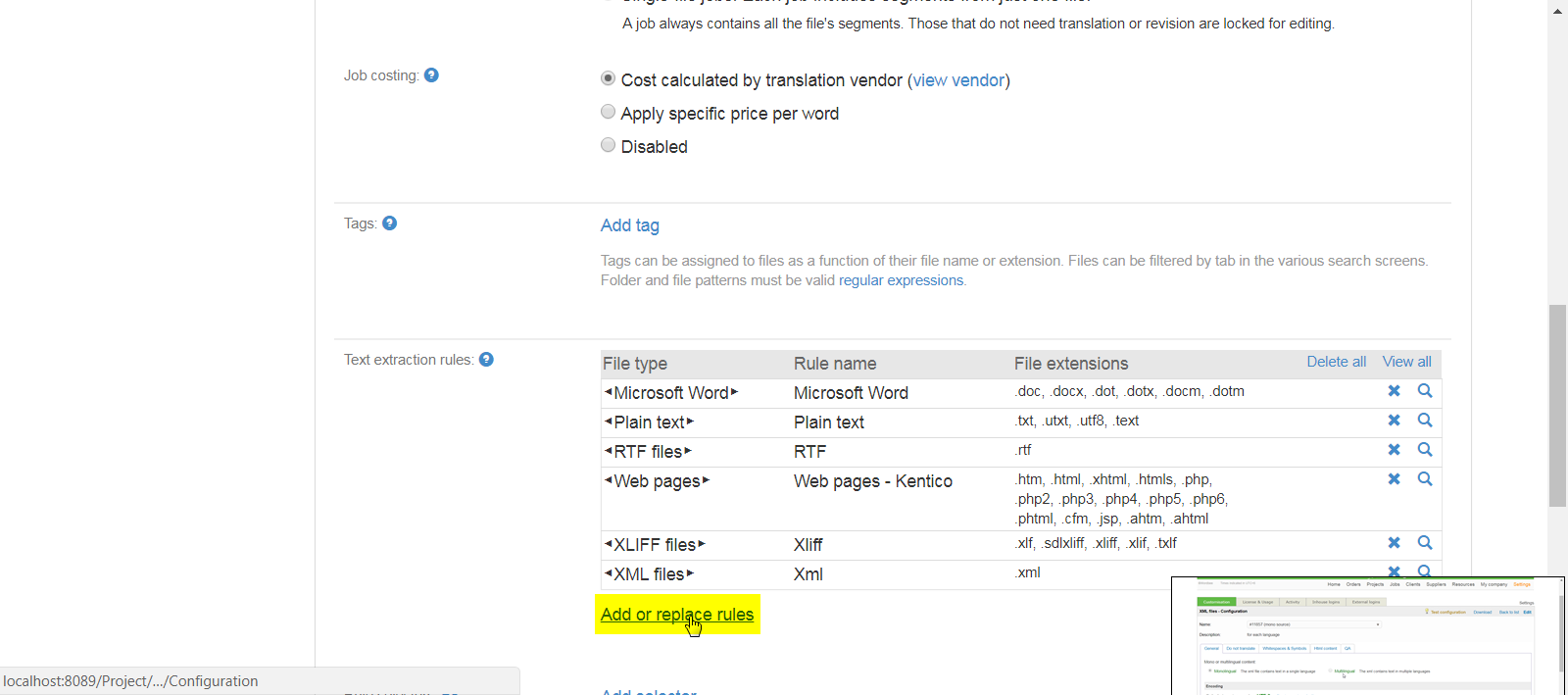
7. Paste the content copied in point 5 into the area highlighted in yellow on a below screenshot
 and click Save.
If this is the configuration you would like to use make sure to delete other XML configurations for this project in Beebox

Hope this is clear.
If you need however further assistance submit a ticket, please.
All the best
Wojciech
0
Bitte melden Sie sich an, um einen Kommentar zu hinterlassen.
Kommentare
3 Kommentare