
Until now, when you wanted to download a translated file with misplaced tags, a pop-up with the message “Operation failed” was displayed:

This message did not give you any information about the reason of the failure.
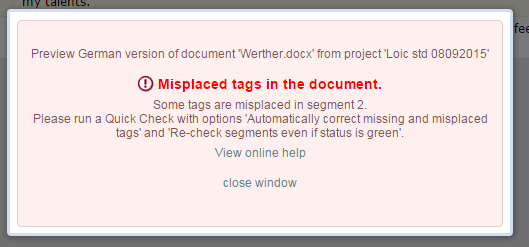
Now, a more explicit message is displayed, giving you information about the nature of the error, and how to fix it (mainly by running a Quick Check). It also contains a link to reach the online help where further information can be found.
Comments
2 comments
Does this work all the time? For Codyt jobs too? We just received an Operation failed error and no helpful information.
Hi Aaron,
For the time being, those error messages are shown when you have some misplaced tags in translated versions of documents (it doesn't matter where you are reconstructing this document), but we will replace other "Operation failed" error messages later.
Loïc
Please sign in to leave a comment.